> ## Documentation Index
> Fetch the complete documentation index at: https://wb-21fd5541-dependabot-github-actions-actions-cache-6.mintlify.site/llms.txt
> Use this file to discover all available pages before exploring further.

# 評価を作成する

> Weave Models と評価機能を使って、評価パイプラインを構築する方法を学びます

export const GitHubLink = ({url}) => <a href={url} target="_blank" rel="noopener noreferrer" className="github-source-link">
    <svg width="20" height="20" viewBox="0 0 24 24" fill="currentColor" xmlns="http://www.w3.org/2000/svg">
      <path d="M12 0C5.37 0 0 5.37 0 12c0 5.31 3.435 9.795 8.205 11.385.6.105.825-.255.825-.57 0-.285-.015-1.23-.015-2.235-3.015.555-3.795-.735-4.035-1.41-.135-.345-.72-1.41-1.23-1.695-.42-.225-1.02-.78-.015-.795.945-.015 1.62.87 1.845 1.23 1.08 1.815 2.805 1.305 3.495.99.105-.78.42-1.305.765-1.605-2.67-.3-5.46-1.335-5.46-5.925 0-1.305.465-2.385 1.23-3.225-.12-.3-.54-1.53.12-3.18 0 0 1.005-.315 3.3 1.23.96-.27 1.98-.405 3-.405s2.04.135 3 .405c2.295-1.56 3.3-1.23 3.3-1.23.66 1.65.24 2.88.12 3.18.765.84 1.23 1.905 1.23 3.225 0 4.605-2.805 5.625-5.475 5.925.435.375.81 1.095.81 2.22 0 1.605-.015 2.895-.015 3.3 0 .315.225.69.825.57A12.02 12.02 0 0024 12c0-6.63-5.37-12-12-12z" />
    </svg>
    GitHub のソース
  </a>;

export const ColabLink = ({url}) => <a href={url} target="_blank" rel="noopener noreferrer" className="colab-link">
    <svg width="20" height="20" viewBox="0 0 24 24" fill="currentColor" xmlns="http://www.w3.org/2000/svg">
      <path d="M14.25.18l.9.2.73.26.59.3.45.32.34.34.25.34.16.33.1.3.04.26.02.2-.01.13V8.5l-.05.63-.13.55-.21.46-.26.38-.3.31-.33.25-.35.19-.35.14-.33.1-.3.07-.26.04-.21.02H8.77l-.69.05-.59.14-.5.22-.41.27-.33.32-.27.35-.2.36-.15.37-.1.35-.07.32-.04.27-.02.21v3.06H3.17l-.21-.03-.28-.07-.32-.12-.35-.18-.36-.26-.36-.36-.35-.46-.32-.59-.28-.73-.21-.88-.14-1.05-.05-1.23.06-1.22.16-1.04.24-.87.32-.71.36-.57.4-.44.42-.33.42-.24.4-.16.36-.1.32-.05.24-.01h.16l.06.01h8.16v-.83H6.18l-.01-2.75-.02-.37.05-.34.11-.31.17-.28.25-.26.31-.23.38-.2.44-.18.51-.15.58-.12.64-.1.71-.06.77-.04.84-.02 1.27.05zm-6.3 1.98l-.23.33-.08.41.08.41.23.34.33.22.41.09.41-.09.33-.22.23-.34.08-.41-.08-.41-.23-.33-.33-.22-.41-.09-.41.09zm13.09 3.95l.28.06.32.12.35.18.36.27.36.35.35.47.32.59.28.73.21.88.14 1.04.05 1.23-.06 1.23-.16 1.04-.24.86-.32.71-.36.57-.4.45-.42.33-.42.24-.4.16-.36.09-.32.05-.24.02-.16-.01h-8.22v.82h5.84l.01 2.76.02.36-.05.34-.11.31-.17.29-.25.25-.31.24-.38.2-.44.17-.51.15-.58.13-.64.09-.71.07-.77.04-.84.01-1.27-.04-1.07-.14-.9-.2-.73-.25-.59-.3-.45-.33-.34-.34-.25-.34-.16-.33-.1-.3-.04-.25-.02-.2.01-.13v-5.34l.05-.64.13-.54.21-.46.26-.38.3-.32.33-.24.35-.2.35-.14.33-.1.3-.06.26-.04.21-.02.13-.01h5.84l.69-.05.59-.14.5-.21.41-.28.33-.32.27-.35.2-.36.15-.36.1-.35.07-.32.04-.28.02-.21V6.07h2.09l.14.01.21.03zm-6.47 14.25l-.23.33-.08.41.08.41.23.33.33.23.41.08.41-.08.33-.23.23-.33.08-.41-.08-.41-.23-.33-.33-.23-.41-.08-.41.08z" />
    </svg>
    Colabで試す
  </a>;

<div style={{ display: 'flex', gap: '12px', flexWrap: 'wrap' }}>
  <ColabLink url="https://colab.research.google.com/github/wandb/docs/blob/main/weave/cookbooks/source/build_an_evaluation_pipeline.ipynb" />

  <GitHubLink url="https://github.com/wandb/docs/blob/main/weave/cookbooks/source/build_an_evaluation_pipeline.ipynb" />
</div>

このチュートリアルでは、Weave でエンドツーエンドの評価パイプラインを構築し、改善を重ねながら LLM アプリケーションの品質を測定してトラッキングする方法を学びます。評価を使うと、一貫した一連のサンプルに対して変更を比較し、ユーザーに届く前にリグレッションを検出できます。このチュートリアルは、LLM を活用したアプリケーションを構築し、それらをテストするための再現可能な方法を求める開発者を対象としています。

Weave は、[`Model`](/ja/weave/guides/core-types/models) クラスと [`Evaluation`](/ja/weave/guides/core-types/evaluations) クラスによる評価のトラッキングをネイティブにサポートしています。API は前提を最小限に抑えて設計されているため、幅広いユースケースに柔軟に対応できます。

<img src="https://mintcdn.com/wb-21fd5541-dependabot-github-actions-actions-cache-6/_ij2zBj3_K22WonY/images/evals-hero.png?fit=max&auto=format&n=_ij2zBj3_K22WonY&q=85&s=6c557626d4861fbfaacf41f1bfc51a7f" alt="Evals hero" width="4100" height="2160" data-path="images/evals-hero.png" />

<div id="what-youll-learn">
  ## このガイドで学ぶこと
</div>

このガイドでは、次の内容を学びます。

* `Model` を設定する。
* LLM の応答をテストするためのデータセットを作成する。
* モデルの出力を期待される出力と比較するスコアリング関数を定義する。
* スコアリング関数と追加の組み込み Scorer を使用して、データセットに対するモデルの評価を実行する。
* 評価結果を Weave UI で確認する。

最後には、サンプルのモデルをデータセットに対してスコアリングし、その結果を Weave にログする、動作する評価パイプラインが完成します。

<div id="prerequisites">
  ## 前提条件
</div>

* [W\&Bアカウント](https://wandb.ai/signup)
* Python 3.10+ または Node.js 18+
* 必要なパッケージがインストールされていること:
  * **Python**: `pip install weave openai`
  * **TypeScript**: `npm install weave openai`
* [OpenAI APIキー](https://platform.openai.com/api-keys) が環境変数として設定されていること。

<div id="import-the-necessary-libraries-and-functions">
  ## 必要なライブラリと関数をインポートする
</div>

以下のライブラリをスクリプトにインポートします。

<Tabs>
  <Tab title="Python">
    ```python lines theme={null}
    import json
    import openai
    import asyncio
    import weave
    from weave.scorers import MultiTaskBinaryClassificationF1
    ```
  </Tab>

  <Tab title="TypeScript">
    ```typescript twoslash lines theme={null}
    // @noErrors
    import * as weave from 'weave';
    import OpenAI from 'openai';
    ```
  </Tab>
</Tabs>

<div id="build-a-model">
  ## `Model` を作成する
</div>

ライブラリの準備ができたら、次のステップは評価したいモデルを定義することです。

Weave では、[`Models` はオブジェクト](/ja/weave/guides/core-types/models)であり、モデルまたはエージェントの動作 (ロジック、prompt、パラメーター) と、バージョン管理されたメタデータ (パラメーター、code、マイクロ設定) の両方を取得します。これにより、モデルを確実にトラッキング、比較、評価し、反復的に改善できます。

`Model` をインスタンス化すると、Weave はその設定と動作を自動的に取得し、変更が発生するとバージョンを更新します。これにより、改善を重ねながら、時間の経過に伴うパフォーマンスをトラッキングできます。

`Model` を宣言するには、`Model` をサブクラス化し、1 つの example を受け取って response を返す `predict` 関数を実装します。

次のモデル例では、OpenAI を使用して入力文からエイリアンの果物の名前、色、味を抽出します。

<Tabs>
  <Tab title="Python">
    ```python lines {1,5} theme={null}
    class ExtractFruitsModel(weave.Model):
        model_name: str
        prompt_template: str

        @weave.op()
        async def predict(self, sentence: str) -> dict:
            client = openai.AsyncClient()

            response = await client.chat.completions.create(
                model=self.model_name,
                messages=[
                    {"role": "user", "content": self.prompt_template.format(sentence=sentence)}
                ],
            )
            result = response.choices[0].message.content
            if result is None:
                raise ValueError("No response from model")
            parsed = json.loads(result)
            return parsed
    ```
  </Tab>

  <Tab title="TypeScript">
    ```typescript twoslash lines {9} theme={null}
    // @noErrors
    // 注: TypeScript では `weave.Model` はまだサポートされていません。
    // 代わりに、モデルのような関数を `weave.op` でラップします

    import * as weave from 'weave';
    import OpenAI from 'openai';

    const openaiClient = new OpenAI();

    const model = weave.op(async function myModel({datasetRow}) {
      const prompt = `Extract fields ("fruit": <str>, "color": <str>, "flavor") from the following text, as json: ${datasetRow.sentence}`;
      const response = await openaiClient.chat.completions.create({
        model: 'gpt-3.5-turbo',
        messages: [{ role: 'user', content: prompt }],
        response_format: { type: 'json_object' }
      });
      return JSON.parse(response.choices[0].message.content);
    });
    ```
  </Tab>
</Tabs>

`ExtractFruitsModel` クラスは `weave.Model` を継承 (サブクラス化) しているため、Weave はインスタンス化されたオブジェクトをトラッキングできます。`@weave.op` は `predict` 関数をデコレートし、その inputs と 出力 をトラッキングします。

`Model` オブジェクトは次のようにインスタンス化できます。

<Tabs>
  <Tab title="Python">
    ```python lines theme={null}
    # チームとプロジェクト名を設定します
    weave.init('[YOUR-TEAM]/eval_pipeline_quickstart')

    model = ExtractFruitsModel(
        model_name='gpt-3.5-turbo-1106',
        prompt_template='Extract fields ("fruit": <str>, "color": <str>, "flavor": <str>) from the following text, as json: {sentence}'
    )

    sentence = "There are many fruits that were found on the recently discovered planet Goocrux. There are neoskizzles that grow there, which are purple and taste like candy."

    print(asyncio.run(model.predict(sentence)))
    # Jupyter Notebook を使用している場合は、次を実行します:
    # await model.predict(sentence)
    ```
  </Tab>

  <Tab title="TypeScript">
    ```typescript twoslash theme={null}
    // @noErrors
    await weave.init('eval_pipeline_quickstart');

    const sentence = "There are many fruits that were found on the recently discovered planet Goocrux. There are neoskizzles that grow there, which are purple and taste like candy.";

    const result = await model({ datasetRow: { sentence } });

    console.log(result);
    ```
  </Tab>
</Tabs>

<div id="create-a-dataset">
  ## データセットを作成する
</div>

`Model` を定義したら、次はそれを評価するためのデータセットが必要です。[`Dataset`](/ja/weave/guides/core-types/datasets) は Weaveオブジェクトとして保存されるサンプルのコレクションです。データセットを Weave に公開するとバージョン管理され、評価 run 間で再利用できるようになります。

次のデータセット例では、3 つの入力文のサンプルとそれぞれの正解 (`labels`) を定義し、スコアリング関数が読み取れる JSON の表形式に整形します。

この例では、コード内でサンプルのリストを作成していますが、実行中のアプリケーションから 1 件ずつログすることもできます。

<Tabs>
  <Tab title="Python">
    ```python lines theme={null}
    sentences = ["There are many fruits that were found on the recently discovered planet Goocrux. There are neoskizzles that grow there, which are purple and taste like candy.",
    "Pounits are a bright green color and are more savory than sweet.",
    "Finally, there are fruits called glowls, which have a very sour and bitter taste which is acidic and caustic, and a pale orange tinge to them."]
    labels = [
        {'fruit': 'neoskizzles', 'color': 'purple', 'flavor': 'candy'},
        {'fruit': 'pounits', 'color': 'bright green', 'flavor': 'savory'},
        {'fruit': 'glowls', 'color': 'pale orange', 'flavor': 'sour and bitter'}
    ]
    examples = [
        {'id': '0', 'sentence': sentences[0], 'target': labels[0]},
        {'id': '1', 'sentence': sentences[1], 'target': labels[1]},
        {'id': '2', 'sentence': sentences[2], 'target': labels[2]}
    ]
    ```
  </Tab>

  <Tab title="TypeScript">
    ```typescript twoslash theme={null}
    // @noErrors
    const sentences = [
      "There are many fruits that were found on the recently discovered planet Goocrux. There are neoskizzles that grow there, which are purple and taste like candy.",
      "Pounits are a bright green color and are more savory than sweet.",
      "Finally, there are fruits called glowls, which have a very sour and bitter taste which is acidic and caustic, and a pale orange tinge to them."
    ];
    const labels = [
      { fruit: 'neoskizzles', color: 'purple', flavor: 'candy' },
      { fruit: 'pounits', color: 'bright green', flavor: 'savory' },
      { fruit: 'glowls', color: 'pale orange', flavor: 'sour and bitter' }
    ];
    const examples = sentences.map((sentence, i) => ({
      id: i.toString(),
      sentence,
      target: labels[i]
    }));
    ```
  </Tab>
</Tabs>

次に、`weave.Dataset()` クラスを使ってデータセットを作成し、公開します。

<Tabs>
  <Tab title="Python">
    ```python lines {2} theme={null}
    weave.init('eval_pipeline_quickstart')
    dataset = weave.Dataset(name='fruits', rows=examples)
    weave.publish(dataset)
    ```
  </Tab>

  <Tab title="TypeScript">
    ```typescript twoslash lines {3-6} theme={null}
    // @noErrors
    import * as weave from 'weave';
    await weave.init('eval_pipeline_quickstart');
    const dataset = new weave.Dataset({
      name: 'fruits',
      rows: examples
    });
    await dataset.save();
    ```
  </Tab>
</Tabs>

<div id="define-custom-scoring-functions">
  ## カスタムのスコアリング関数を定義する
</div>

モデルとデータセットが用意できたら、各サンプルに対するモデルのパフォーマンスを測定する方法が必要です。スコアリング関数は、モデルの出力を期待される `target` と比較し、評価がレポートするメトリクスを生成します。

Weave の評価を使用する場合、Weave では `output` と比較するための `target` が必要です。次のスコアリング関数は 2 つの辞書 (`target` と `output`) を受け取り、出力が `target` と一致するかどうかを示す真偽値の辞書を返します。`@weave.op()` デコレーターを使うと、Weave でスコアリング関数の実行をトラッキングできます。

<Tabs>
  <Tab title="Python">
    ```python lines theme={null}
    @weave.op()
    def fruit_name_score(target: dict, output: dict) -> dict:
        return {'correct': target['fruit'] == output['fruit']}
    ```
  </Tab>

  <Tab title="TypeScript">
    ```typescript twoslash theme={null}
    // @noErrors
    import * as weave from 'weave';

    const fruitNameScorer = weave.op(
      function fruitNameScore({target, output}) {
        return { correct: target.fruit === output.fruit };
      }
    );
    ```
  </Tab>
</Tabs>

独自のスコアリング関数を作成する方法については、[Scorer](/ja/weave/guides/evaluation/scorers) ガイドを参照してください。

アプリケーションによっては、カスタムの `Scorer` クラスを作成したい場合があります。たとえば、特定のパラメーター (チャットモデルやプロンプトなど) 、特定の行に対するスコアリング、集約スコアの計算を備えた、標準化された `LLMJudge` クラスを作成できます。詳細は、[RAG アプリケーションのモデルベース評価](/ja/weave/tutorial-rag#optional-defining-a-scorer-class) にある `Scorer` クラスの定義に関するチュートリアルを参照してください。

<div id="use-a-built-in-scorer-and-run-the-evaluation">
  ## 組み込み Scorer を使用して評価を実行する
</div>

モデル、データセット、カスタム Scorer の準備が整ったので、あとはそれらをまとめて 評価 run を構成するだけです。

カスタムのスコアリング関数に加えて、[Weave の組み込み Scorer](/ja/weave/guides/evaluation/builtin_scorers)も使用できます。以下の評価では、`weave.Evaluation()` は前のセクションで定義した `fruit_name_score` 関数と、[F1 スコア](https://en.wikipedia.org/wiki/F-score)を計算する組み込みの `MultiTaskBinaryClassificationF1` Scorer を使用します。

次の例では、2 つのスコアリング関数を使用して `fruits` データセット上で `ExtractFruitsModel` を評価し、その結果を Weave にログします。

<Tabs>
  <Tab title="Python">
    ```python lines {3-10} theme={null}
    weave.init('eval_pipeline_quickstart')

    evaluation = weave.Evaluation(
        name='fruit_eval',
        dataset=dataset, 
        scorers=[
            MultiTaskBinaryClassificationF1(class_names=["fruit", "color", "flavor"]), 
            fruit_name_score
        ],
    )
    print(asyncio.run(evaluation.evaluate(model)))
    # Jupyter Notebook で実行している場合は、次を実行します:
    # await evaluation.evaluate(model)
    ```
  </Tab>

  <Tab title="TypeScript">
    ```typescript twoslash lines {5-9} theme={null}
    // @noErrors
    import * as weave from 'weave';

    await weave.init('eval_pipeline_quickstart');

    const evaluation = new weave.Evaluation({
      name: 'fruit_eval',
      dataset: dataset,
      scorers: [fruitNameScorer],
    });
    const results = await evaluation.evaluate(model);
    console.log(results);
    ```
  </Tab>
</Tabs>

<Note>
  Python スクリプトから実行する場合は、`asyncio.run` を使用する必要があります。一方、Jupyter Notebook から実行する場合は、`await` を直接使用できます。
</Note>

<div id="complete-example">
  ### 完全な例
</div>

<Accordion title="1つのスクリプトで完結する評価パイプライン:">
  <Tabs>
    <Tab title="Python">
      ```python lines theme={null}
      import json
      import asyncio
      import openai
      import weave
      from weave.scorers import MultiTaskBinaryClassificationF1

      # Weave を一度初期化する
      weave.init('eval_pipeline_quickstart')

      # 1. モデルを定義する
      class ExtractFruitsModel(weave.Model):
          model_name: str
          prompt_template: str

          @weave.op()
          async def predict(self, sentence: str) -> dict:
              client = openai.AsyncClient()
              response = await client.chat.completions.create(
                  model=self.model_name,
                  messages=[{"role": "user", "content": self.prompt_template.format(sentence=sentence)}],
              )
              result = response.choices[0].message.content
              if result is None:
                  raise ValueError("No response from model")
              return json.loads(result)

      # 2. モデルをインスタンス化する
      model = ExtractFruitsModel(
          model_name='gpt-3.5-turbo-1106',
          prompt_template='Extract fields ("fruit": <str>, "color": <str>, "flavor": <str>) from the following text, as json: {sentence}'
      )

      # 3. データセットを作成する
      sentences = ["There are many fruits that were found on the recently discovered planet Goocrux. There are neoskizzles that grow there, which are purple and taste like candy.",
      "Pounits are a bright green color and are more savory than sweet.",
      "Finally, there are fruits called glowls, which have a very sour and bitter taste which is acidic and caustic, and a pale orange tinge to them."]
      labels = [
          {'fruit': 'neoskizzles', 'color': 'purple', 'flavor': 'candy'},
          {'fruit': 'pounits', 'color': 'bright green', 'flavor': 'savory'},
          {'fruit': 'glowls', 'color': 'pale orange', 'flavor': 'sour and bitter'}
      ]
      examples = [
          {'id': '0', 'sentence': sentences[0], 'target': labels[0]},
          {'id': '1', 'sentence': sentences[1], 'target': labels[1]},
          {'id': '2', 'sentence': sentences[2], 'target': labels[2]}
      ]

      dataset = weave.Dataset(name='fruits', rows=examples)
      weave.publish(dataset)

      # 4. スコアリング関数を定義する
      @weave.op()
      def fruit_name_score(target: dict, output: dict) -> dict:
          return {'correct': target['fruit'] == output['fruit']}

      # 5. 評価を実行する
      evaluation = weave.Evaluation(
          name='fruit_eval',
          dataset=dataset,
          scorers=[
              MultiTaskBinaryClassificationF1(class_names=["fruit", "color", "flavor"]),
              fruit_name_score
          ],
      )
      print(asyncio.run(evaluation.evaluate(model)))
      ```
    </Tab>

    <Tab title="TypeScript">
      ```typescript twoslash lines theme={null}
      // @noErrors
      import * as weave from 'weave';
      import OpenAI from 'openai';

      // Weave を一度初期化する
      await weave.init('eval_pipeline_quickstart');

      // 1. モデルを定義する
      // 注意: weave.Model は TypeScript ではまだサポートされていません。
      // 代わりに、モデルのような関数を weave.op でラップしてください。
      const openaiClient = new OpenAI();

      const model = weave.op(async function myModel({datasetRow}) {
        const prompt = `Extract fields ("fruit": <str>, "color": <str>, "flavor": <str>) from the following text, as json: ${datasetRow.sentence}`;
        const response = await openaiClient.chat.completions.create({
          model: 'gpt-3.5-turbo',
          messages: [{ role: 'user', content: prompt }],
          response_format: { type: 'json_object' }
        });
        return JSON.parse(response.choices[0].message.content);
      });

      // 2. データセットを作成する
      const sentences = [
        "There are many fruits that were found on the recently discovered planet Goocrux. There are neoskizzles that grow there, which are purple and taste like candy.",
        "Pounits are a bright green color and are more savory than sweet.",
        "Finally, there are fruits called glowls, which have a very sour and bitter taste which is acidic and caustic, and a pale orange tinge to them."
      ];
      const labels = [
        { fruit: 'neoskizzles', color: 'purple', flavor: 'candy' },
        { fruit: 'pounits', color: 'bright green', flavor: 'savory' },
        { fruit: 'glowls', color: 'pale orange', flavor: 'sour and bitter' }
      ];
      const examples = sentences.map((sentence, i) => ({
        id: i.toString(),
        sentence,
        target: labels[i]
      }));

      const dataset = new weave.Dataset({
        name: 'fruits',
        rows: examples
      });
      await dataset.save();

      // 3. スコアリング関数を定義する
      const fruitNameScorer = weave.op(
        function fruitNameScore({target, output}) {
          return { correct: target.fruit === output.fruit };
        }
      );

      // 4. 評価を実行する
      const evaluation = new weave.Evaluation({
        name: 'fruit_eval',
        dataset: dataset,
        scorers: [fruitNameScorer],
      });
      const results = await evaluation.evaluate(model);
      console.log(results);
      ```
    </Tab>
  </Tabs>
</Accordion>

<div id="view-your-evaluation-results">
  ## 評価結果を確認する
</div>

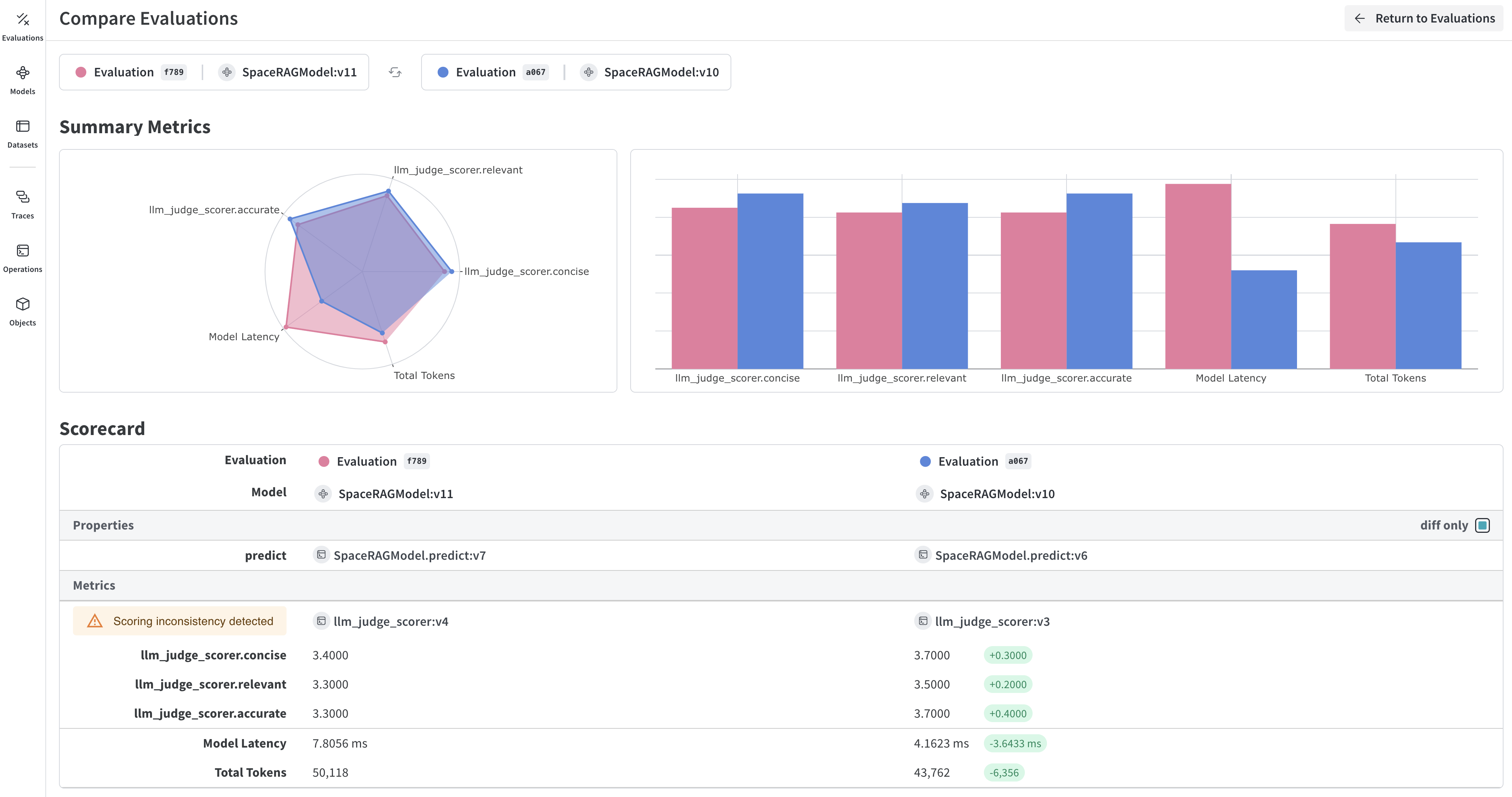
評価が完了すると、Weave UI で各予測と Scorer の結果を確認できます。Weave は、各予測とスコアのトレースを自動的に記録します。評価の実行時に出力されるリンクをクリックすると、Weave UI で結果を確認できます。

<img src="https://mintcdn.com/wb-21fd5541-dependabot-github-actions-actions-cache-6/_ij2zBj3_K22WonY/images/evals-hero.png?fit=max&auto=format&n=_ij2zBj3_K22WonY&q=85&s=6c557626d4861fbfaacf41f1bfc51a7f" alt="評価結果" width="4100" height="2160" data-path="images/evals-hero.png" />

<div id="learn-more-about-weave-evaluations">
  ## Weave の評価についてさらに詳しく見る
</div>

これで、完全な評価パイプラインが完成しました。Weave の評価機能をさらに深く理解するには、次のリソースを参照してください。

* [scorer の構築方法と使用方法](/ja/weave/guides/evaluation/scorers)について詳しく学びます。
* Weave の[組み込みスコアリング関数](/ja/weave/guides/evaluation/builtin_scorers)を確認します。
* LLM を判定者として使用する[モデルベース評価](/ja/weave/guides/evaluation/scorers#model-based-evaluation)について学びます。

<div id="next-steps">
  ## 次のステップ
</div>

[RAG アプリケーションを構築して](/ja/weave/tutorial-rag)、検索拡張生成の評価について学びましょう。
