> ## Documentation Index
> Fetch the complete documentation index at: https://wb-21fd5541-dependabot-github-actions-actions-cache-6.mintlify.site/llms.txt
> Use this file to discover all available pages before exploring further.
# ネストされた関数をトレースする
> W&B トレースを使用して深くネストした Call 構造をトラッキングする方法を学びます
このチュートリアルでは、Weave でネストされた関数をトレースする方法を説明します。これにより、サブ関数やその親子関係を含む、LLM を活用したアプリケーションの実行フロー全体をモニターできます。最後には、Weave の **Traces** ページでネストしたトレースを取得し、可視化して、メタデータを追加できるようになります。
LLM を活用したアプリケーションには、複数の LLM Call に加えて、追加のデータ処理や、モニターするうえで重要な検証ロジックが含まれることがあります。こうしたネストされた関数とその親子関係は、Python では `@weave.op()` デコレーターを使用し、TypeScript では `weave.op()` でラップすることで、Weave でトラッキングできます。
アプリケーションの完全な実行フローを取得するため、関数とサブ関数はできるだけ細かい粒度でデコレートしてください。これにより、アプリケーションの動作をより深く理解し、適切に調整できるようになります。
## ネストされた関数をトレースする
このセクションでは、関数とそのネストされたサブ関数をトレースする例を順を追って説明します。次のコードは [クイックスタートの例](/ja/weave/quickstart) を基に、LLM から返された項目数を数え、それらをより上位レベルの関数でラップするロジックを追加したものです。さらに、この例では `weave.op()` を使用して、すべての関数、その Call 順序、および親子関係をトレースします。
```python {1,7,26,32,42} theme={null}
import weave
import json
from openai import OpenAI
client = OpenAI()
@weave.op()
def extract_dinos(sentence: str) -> dict:
response = client.chat.completions.create(
model="gpt-4o",
messages=[
{
"role": "system",
"content": """Extract any dinosaur `name`, their `common_name`, \
names and whether its `diet` is a herbivore or carnivore, in JSON format."""
},
{
"role": "user",
"content": sentence
}
],
response_format={ "type": "json_object" }
)
return response.choices[0].message.content
@weave.op()
def count_dinos(dino_data: dict) -> int:
# 返されたリスト内の項目数を数える
k = list(dino_data.keys())[0]
return len(dino_data[k])
@weave.op()
def dino_tracker(sentence: str) -> dict:
# LLM を使用して恐竜を抽出する
dino_data = extract_dinos(sentence)
# 返された恐竜の数を数える
dino_data = json.loads(dino_data)
n_dinos = count_dinos(dino_data)
return {"n_dinosaurs": n_dinos, "dinosaurs": dino_data}
weave.init('jurassic-park')
sentence = """I watched as a Tyrannosaurus rex (T. rex) chased after a Triceratops (Trike), \
both carnivore and herbivore locked in an ancient dance. Meanwhile, a gentle giant \
Brachiosaurus (Brachi) calmly munched on treetops, blissfully unaware of the chaos below."""
result = dino_tracker(sentence)
print(result)
```
**ネストされた関数**
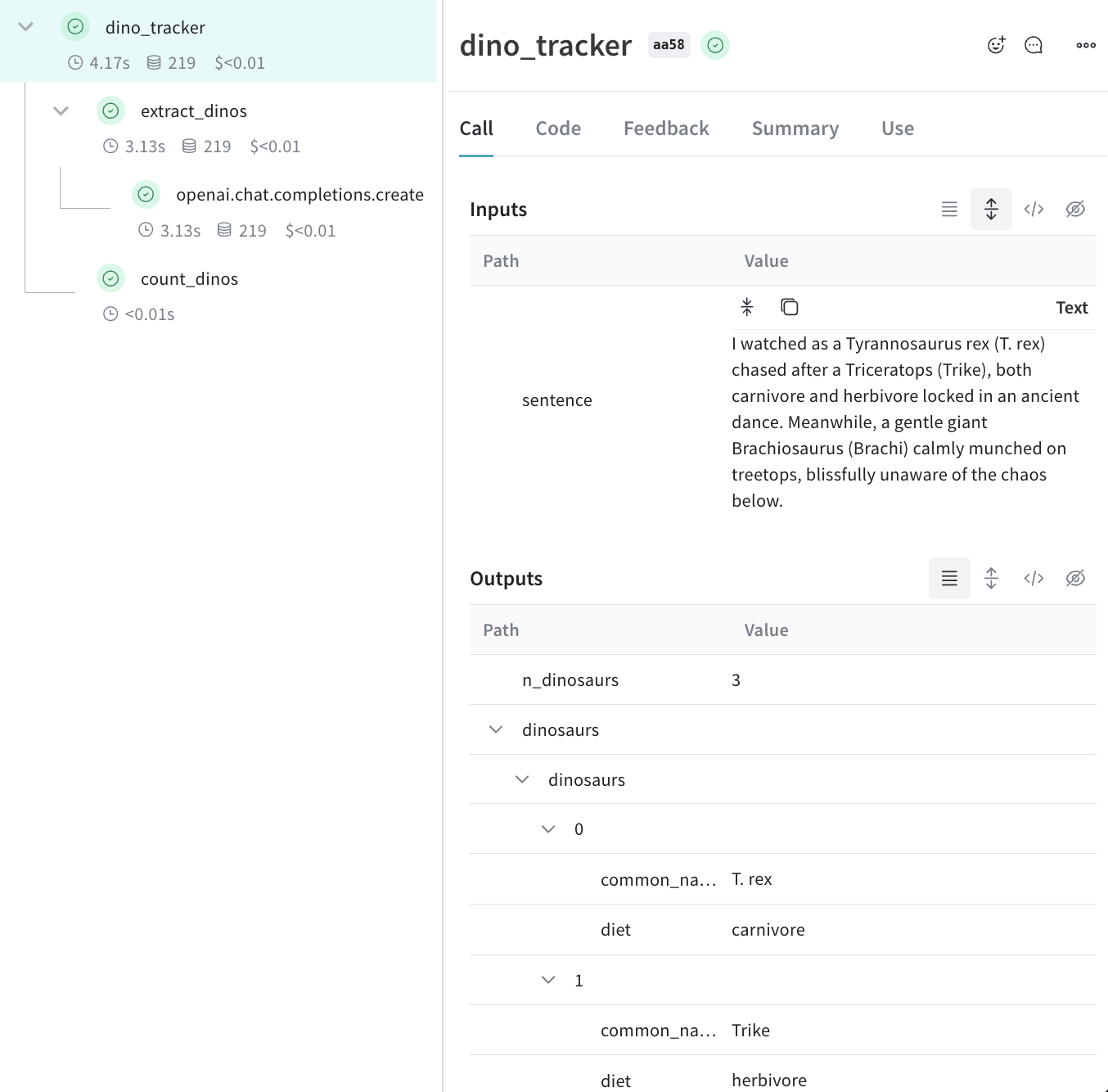
上記のコードを実行すると、**Traces** ページに、ネストされた 2 つの関数 (`extract_dinos` と `count_dinos`) の入力と出力に加え、自動的に記録された OpenAI のトレースが表示されます。
 ```typescript twoslash theme={null}
// @noErrors
import OpenAI from 'openai';
import * as weave from 'weave';
const openai = new OpenAI();
const extractDinos = weave.op(async (sentence: string) => {
const response = await openai.chat.completions.create({
model: 'gpt-4o',
messages: [
{
role: 'system',
content:
'Extract any dinosaur `name`, their `common_name`, names and whether its `diet` is a herbivore or carnivore, in JSON format.',
},
{role: 'user', content: sentence},
],
response_format: {type: 'json_object'},
});
return response.choices[0].message.content;
});
const countDinos = weave.op(async (dinoData: string) => {
const parsed = JSON.parse(dinoData);
return Object.keys(parsed).length;
});
const dinoTracker = weave.op(async (sentence: string) => {
const dinoData = await extractDinos(sentence);
const nDinos = await countDinos(dinoData);
return {nDinos, dinoData};
});
async function main() {
await weave.init('jurassic-park');
const sentence = `I watched as a Tyrannosaurus rex (T. rex) chased after a Triceratops (Trike),
both carnivore and herbivore locked in an ancient dance. Meanwhile, a gentle giant
Brachiosaurus (Brachi) calmly munched on treetops, blissfully unaware of the chaos below.`;
const result = await dinoTracker(sentence);
console.log(result);
}
main();
```
**ネストされた関数**
上記のコードを実行すると、**Traces** ページに、ネストされた 2 つの関数 (`extract_dinos` と `count_dinos`) の入力と出力に加え、自動的に記録された OpenAI のトレースが表示されます。
コードを実行すると、各関数の Call とその相互関係を捉えた完全なネストされたトレースが Weave に作成されます。
```typescript twoslash theme={null}
// @noErrors
import OpenAI from 'openai';
import * as weave from 'weave';
const openai = new OpenAI();
const extractDinos = weave.op(async (sentence: string) => {
const response = await openai.chat.completions.create({
model: 'gpt-4o',
messages: [
{
role: 'system',
content:
'Extract any dinosaur `name`, their `common_name`, names and whether its `diet` is a herbivore or carnivore, in JSON format.',
},
{role: 'user', content: sentence},
],
response_format: {type: 'json_object'},
});
return response.choices[0].message.content;
});
const countDinos = weave.op(async (dinoData: string) => {
const parsed = JSON.parse(dinoData);
return Object.keys(parsed).length;
});
const dinoTracker = weave.op(async (sentence: string) => {
const dinoData = await extractDinos(sentence);
const nDinos = await countDinos(dinoData);
return {nDinos, dinoData};
});
async function main() {
await weave.init('jurassic-park');
const sentence = `I watched as a Tyrannosaurus rex (T. rex) chased after a Triceratops (Trike),
both carnivore and herbivore locked in an ancient dance. Meanwhile, a gentle giant
Brachiosaurus (Brachi) calmly munched on treetops, blissfully unaware of the chaos below.`;
const result = await dinoTracker(sentence);
console.log(result);
}
main();
```
**ネストされた関数**
上記のコードを実行すると、**Traces** ページに、ネストされた 2 つの関数 (`extract_dinos` と `count_dinos`) の入力と出力に加え、自動的に記録された OpenAI のトレースが表示されます。
コードを実行すると、各関数の Call とその相互関係を捉えた完全なネストされたトレースが Weave に作成されます。
## メタデータをトラッキングする
Weave がネストされた関数をトレースするようになったので、ユーザーや環境など、run に関する追加のコンテキストをそれらのトレースに付加できます。メタデータをトラッキングするには、`weave.attributes` コンテキストマネージャーを使用し、呼び出し時にトラッキングするメタデータを辞書で渡します。
前の例の続きです。
```python lines {1,10-11} theme={null}
import weave
weave.init('jurassic-park')
sentence = """I watched as a Tyrannosaurus rex (T. rex) chased after a Triceratops (Trike), \
both carnivore and herbivore locked in an ancient dance. Meanwhile, a gentle giant \
Brachiosaurus (Brachi) calmly munched on treetops, blissfully unaware of the chaos below."""
# 以前に定義した関数とあわせてメタデータをトラッキングする
with weave.attributes({'user_id': 'lukas', 'env': 'production'}):
result = dino_tracker(sentence)
```
```plaintext theme={null}
この機能はまだ TypeScript では利用できません。
```
ユーザー ID やコードの実行環境 (開発、ステージング、本番) などのメタデータを実行時にトラッキングします。
システム prompt などのシステム設定をトラッキングするには、[Weave Models](/ja/weave/guides/core-types/models) を使用してください。
attributes の使用方法について詳しくは、[Define and log attributes](/ja/weave/guides/tools/attributes) を参照してください。
## 次のステップ
* [App Versioning チュートリアル](/ja/weave/tutorial-weave_models) に沿って、アドホックなプロンプト、モデル、アプリケーションへの変更を記録し、バージョン管理し、整理しましょう。