> ## Documentation Index
> Fetch the complete documentation index at: https://wb-21fd5541-dependabot-github-actions-actions-cache-6.mintlify.site/llms.txt
> Use this file to discover all available pages before exploring further.

> W&B를 사용해 머신 러닝 Experiments를 추적하고 메트릭, 하이퍼파라미터, 시스템 메트릭, 모델 아티팩트를 로그합니다.

# Experiments Overview

export const TryProductLink = ({url}) => <a href={url} target="_blank" rel="noopener noreferrer" className="github-source-link">
    <svg width="20" height="20" viewBox="0 0 24 24" fill="none" stroke="currentColor" strokeWidth="2" strokeLinecap="round" strokeLinejoin="round" xmlns="http://www.w3.org/2000/svg">
      <line x1="4" y1="21" x2="4" y2="14"></line>
      <line x1="4" y1="10" x2="4" y2="3"></line>
      <line x1="12" y1="21" x2="12" y2="12"></line>
      <line x1="12" y1="8" x2="12" y2="3"></line>
      <line x1="20" y1="21" x2="20" y2="16"></line>
      <line x1="20" y1="12" x2="20" y2="3"></line>
      <circle cx="4" cy="12" r="2"></circle>
      <circle cx="12" cy="10" r="2"></circle>
      <circle cx="20" cy="14" r="2"></circle>
    </svg>
    W&amp;B에서 사용해 보기
  </a>;

export const ColabLink = ({url}) => <a href={url} target="_blank" rel="noopener noreferrer" className="colab-link">
    <svg width="20" height="20" viewBox="0 0 24 24" fill="currentColor" xmlns="http://www.w3.org/2000/svg">
      <path d="M14.25.18l.9.2.73.26.59.3.45.32.34.34.25.34.16.33.1.3.04.26.02.2-.01.13V8.5l-.05.63-.13.55-.21.46-.26.38-.3.31-.33.25-.35.19-.35.14-.33.1-.3.07-.26.04-.21.02H8.77l-.69.05-.59.14-.5.22-.41.27-.33.32-.27.35-.2.36-.15.37-.1.35-.07.32-.04.27-.02.21v3.06H3.17l-.21-.03-.28-.07-.32-.12-.35-.18-.36-.26-.36-.36-.35-.46-.32-.59-.28-.73-.21-.88-.14-1.05-.05-1.23.06-1.22.16-1.04.24-.87.32-.71.36-.57.4-.44.42-.33.42-.24.4-.16.36-.1.32-.05.24-.01h.16l.06.01h8.16v-.83H6.18l-.01-2.75-.02-.37.05-.34.11-.31.17-.28.25-.26.31-.23.38-.2.44-.18.51-.15.58-.12.64-.1.71-.06.77-.04.84-.02 1.27.05zm-6.3 1.98l-.23.33-.08.41.08.41.23.34.33.22.41.09.41-.09.33-.22.23-.34.08-.41-.08-.41-.23-.33-.33-.22-.41-.09-.41.09zm13.09 3.95l.28.06.32.12.35.18.36.27.36.35.35.47.32.59.28.73.21.88.14 1.04.05 1.23-.06 1.23-.16 1.04-.24.86-.32.71-.36.57-.4.45-.42.33-.42.24-.4.16-.36.09-.32.05-.24.02-.16-.01h-8.22v.82h5.84l.01 2.76.02.36-.05.34-.11.31-.17.29-.25.25-.31.24-.38.2-.44.17-.51.15-.58.13-.64.09-.71.07-.77.04-.84.01-1.27-.04-1.07-.14-.9-.2-.73-.25-.59-.3-.45-.33-.34-.34-.25-.34-.16-.33-.1-.3-.04-.25-.02-.2.01-.13v-5.34l.05-.64.13-.54.21-.46.26-.38.3-.32.33-.24.35-.2.35-.14.33-.1.3-.06.26-.04.21-.02.13-.01h5.84l.69-.05.59-.14.5-.21.41-.28.33-.32.27-.35.2-.36.15-.36.1-.35.07-.32.04-.28.02-.21V6.07h2.09l.14.01.21.03zm-6.47 14.25l-.23.33-.08.41.08.41.23.33.33.23.41.08.41-.08.33-.23.23-.33.08-.41-.08-.41-.23-.33-.33-.23-.41-.08-.41.08z" />
    </svg>
    Colab에서 사용해 보기
  </a>;

<CardGroup cols={4}>
  <ColabLink url="https://colab.research.google.com/github/wandb/examples/blob/master/colabs/intro/Intro_to_Weights_%26_Biases.ipynb" />

  <TryProductLink url="https://wandb.ai/stacey/deep-drive/workspace?workspace=user-lavanyashukla" />
</CardGroup>

몇 줄의 코드만으로 머신 러닝 Experiments를 추적할 수 있습니다. 그런 다음 [대화형 대시보드](/ko/models/track/workspaces/)에서 결과를 검토하거나, [Public API](/ko/models/ref/python/public-api/)를 사용해 프로그래밍 방식으로 액세스할 수 있도록 데이터를 Python으로 내보낼 수 있습니다.

[Keras](/ko/models/integrations/keras)와 같은 널리 사용되는 프레임워크를 사용한다면 W\&B 인테그레이션을 활용하세요. 전체 인테그레이션 목록과 코드에 W\&B를 추가하는 방법은 [W\&B 인테그레이션](/ko/models/integrations)을 참조하세요.

<Frame>
  <img src="https://mintcdn.com/wb-21fd5541-dependabot-github-actions-actions-cache-6/_ij2zBj3_K22WonY/images/experiments/experiments_landing_page.png?fit=max&auto=format&n=_ij2zBj3_K22WonY&q=85&s=1ea1088421d18f6a61ff41e8f7831ced" alt="Experiments 대시보드" width="4354" height="2978" data-path="images/experiments/experiments_landing_page.png" />
</Frame>

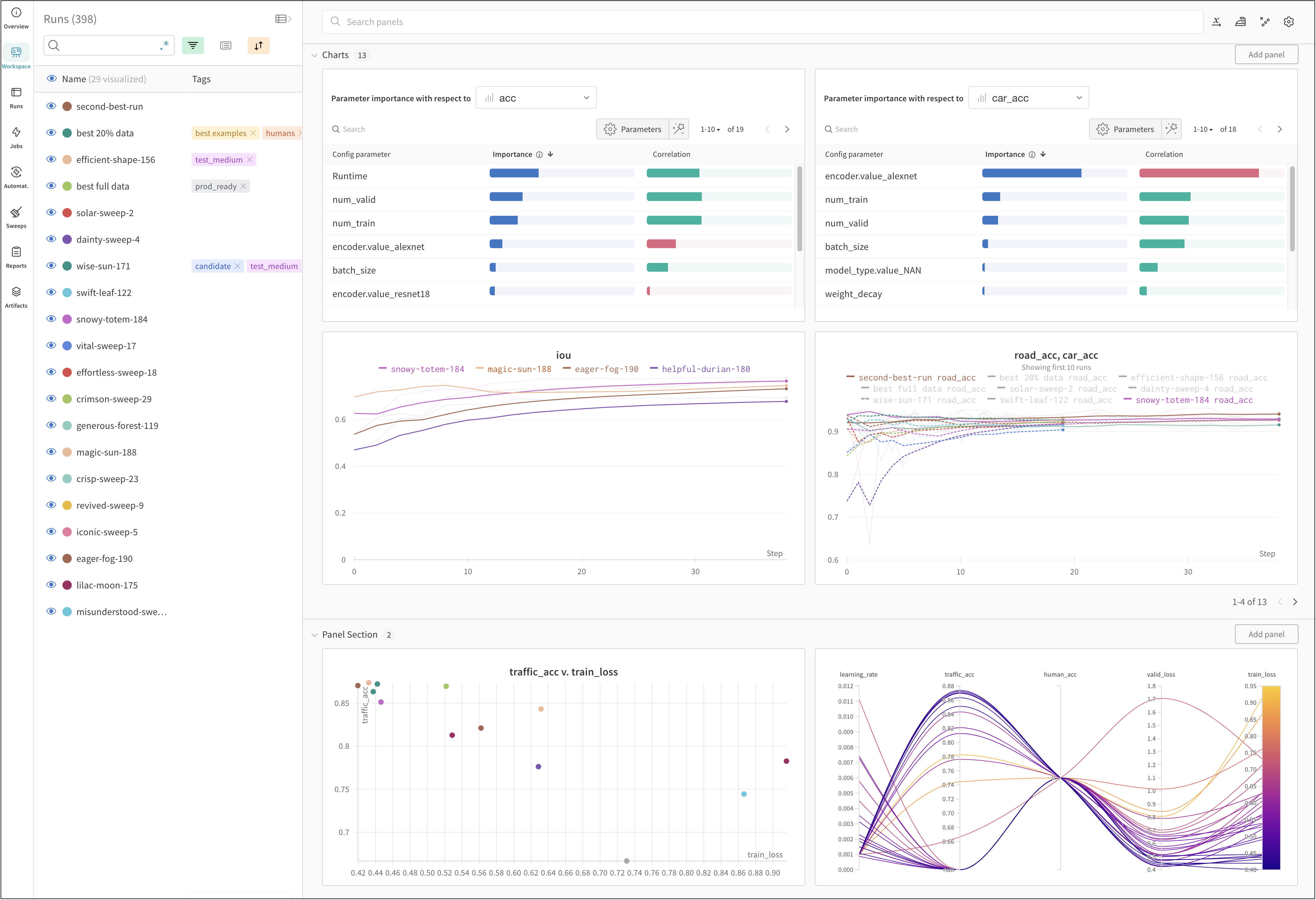
위 이미지는 여러 [runs](/ko/models/runs/)에 걸친 메트릭을 보고 비교할 수 있는 대시보드 예시를 보여줍니다.

<div id="how-it-works">
  ## 작동 방식
</div>

몇 줄의 코드로 머신 러닝 실험을 추적할 수 있습니다:

1. [W\&B Run](/ko/models/runs/)을 생성합니다.
2. 학습률이나 모델 유형 같은 하이퍼파라미터 딕셔너리를 설정([`wandb.Run.config`](/ko/models/track/config/))에 저장합니다.
3. 정확도와 손실 같은 메트릭을 트레이닝 루프에서 시간의 흐름에 따라 로깅합니다([`wandb.Run.log()`](/ko/models/track/log/)).
4. 모델 가중치나 예측 테이블 같은 run 출력물을 저장합니다.

다음 코드는 일반적인 W\&B 실험 추적 워크플로를 보여줍니다:

```python theme={null}
# run을 시작합니다.
#
# 이 블록이 종료되면, 로깅된 데이터 업로드가 완료될 때까지 기다립니다.
# 예외가 발생하면 run은 실패로 표시됩니다.
with wandb.init(entity="", project="my-project-name") as run:
  # 모드 입력값과 하이퍼파라미터를 저장합니다.
  run.config.learning_rate = 0.01

  # 실험 코드를 실행합니다.
  for epoch in range(num_epochs):
    # 트레이닝을 수행합니다...

    # 모델 성능 시각화를 위해 시간 경과에 따른 메트릭을 로깅합니다.
    run.log({"loss": loss})

  # 모델 출력을 아티팩트로 업로드합니다.
  run.log_artifact(model)
```

<div id="get-started">
  ## 시작하기
</div>

사용 사례에 따라 W\&B Experiments를 시작할 때 다음 리소스를 참고하세요:

* 데이터셋 artifact를 생성, 추적, 사용하는 데 활용할 수 있는 W\&B Python SDK command를 단계별로 설명한 [W\&B 퀵스타트](/ko/models/quickstart/)를 읽어보세요.
* 이 장에서 다음 방법을 알아보세요:
  * 실험 생성
  * Experiments 설정
  * Experiments의 데이터 로깅
  * Experiments 결과 보기
* [W\&B API 레퍼런스 가이드](/ko/models/ref/python/)의 [W\&B Python Library](/ko/models/ref/python/)를 살펴보세요.
<div id="best-practices-and-tips">
  ## 모범 사례 및 팁
</div>

Experiments와 logging에 관한 모범 사례와 팁은 [모범 사례: Experiments와 logging](https://wandb.ai/wandb/pytorch-lightning-e2e/reports/W-B-Best-Practices-Guide--VmlldzozNTU1ODY1#w\&b-experiments-and-logging)을 참조하세요.
